Any task-list checkbox you write in a OnePager is automatically picked up as a task. The Tasks view in the left sidebar aggregates every task across every subject, so you can see and tick off what you owe in one place.
Tasks are not stored separately. They live inside your OnePager markdown. Toggling a task in the Tasks view updates the source OnePager on disk, and editing a checkbox inside the OnePager shows up in the Tasks view the next time it refreshes.
Write a task#
Anywhere in a OnePager, use standard markdown checkbox syntax:
- [ ] Schedule the demo for next Tuesday
- [x] Send the pricing proposal
The bullet marker can be - or *. Use [ ] for open, [x] or [X] for done. Nested checkboxes with indentation work too.
Both session-level OnePagers and subject-level OnePagers are scanned.
The Tasks view#
Click Tasks in the left sidebar. Each row shows:
- A circle checkbox you tap to toggle complete or incomplete.
- The task text (struck through when complete).
- The subjects the task belongs to (a task can have several, since a session can).
- The session date it came from.
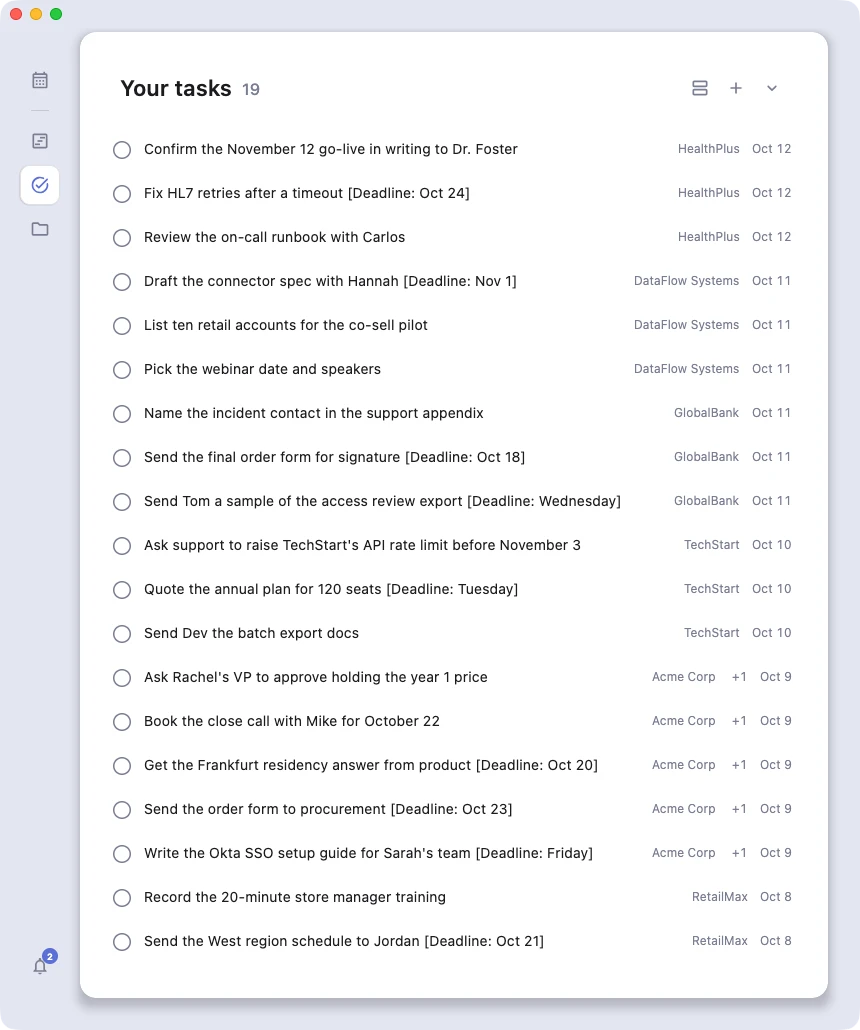
Click anywhere on the row to jump straight to the OnePager and the line where the task lives.
Hover a row and a tooltip shows which meeting it came from: the session's title and its one-line summary. If the session has neither yet, no tooltip appears rather than popping up empty.
Filter, search, group#
The toolbar at the top of the Tasks view lets you:
- Filter by subject (multi-select).
- Show Open, Completed, or All tasks. Default is Open.
- Search by text.
- Sort by session date, newest or oldest first.
- Group by subject for a sectioned view with sticky headers.
- Narrow to a date range if needed.
Toggle tasks from anywhere#
You can tick off a task from three places:
- The Tasks view, by clicking the circle checkbox.
- Inside the OnePager itself, in the Editor, by editing the
[ ]into[x]. - From outside the app, through the MCP server. Claude Desktop, Cursor or any connected client can list your open tasks, mark them done and add notes to them. Azynote redraws while they work. Listing tasks this way, and asking Chat about your tasks, returns the same session title and one-liner the Tasks view shows on hover, so a client or the AI can tell you which meeting a task came from without a second lookup.
All three paths update the same underlying markdown file.
Good to know#
- No separate task store. Tasks live in your OnePager markdown files. Delete the line and the task is gone.
- Auto-refresh. The Tasks view re-scans in the background (every 30 seconds by default), so new and changed tasks show up without a manual refresh. A refresh button is also in the toolbar.
- Deduplication. A session that belongs to multiple subjects does not produce duplicate tasks. The same line from the same OnePager shows up once.