A meeting does not wait for your tools. People talk, decisions land, someone draws the architecture with their hands, and the call ends. Whatever your assistant could not follow live, you rebuild afterwards from memory, if you have the time, which you usually don't, because the next call has already started.
1.7.0 made your context follow you from one session to the next. 1.8.0 is about speed: an assistant that keeps up with the meeting while it happens, and finds anything you have the second you need it.
Transcription as fast as people talk#
If your meetings are in English, French, German, Spanish, Italian or any of 25 European languages, transcription is now instant. Dictation appears as you finish your sentence instead of about two seconds later, transcripts get more accurate, and transcription uses about 0.8 GB of memory instead of about 2 GB. On a 16 GB Mac, that is memory your local model gets back.
You don't pick an engine for this. After the update, Azynote asks once which languages are spoken in your meetings and sets up the transcription that fits. It never switches in the middle of a meeting, and the question is never asked over a running transcription. You can change your answer any time in Settings › Transcription.
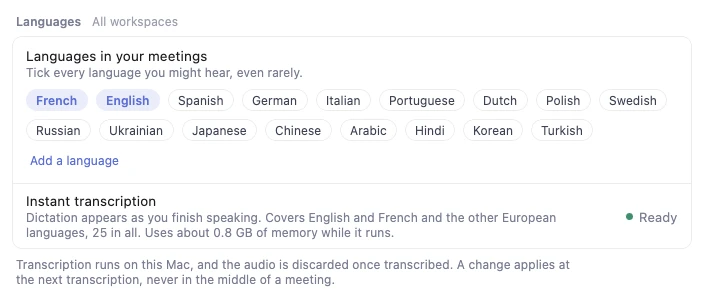
The honest limits: it needs macOS 14 or later, and a 0.7 GB download. If you also hear a language outside the 25, Azynote keeps the transcription that covers them all, exactly as it is today. The audio is still transcribed on your Mac and then discarded.
One search for everything you have#
You remember someone said it. You don't remember where: a meeting, a note, a chat with the agent, the PDF a customer sent, the screenshot of a whiteboard.
Ctrl+Shift+F, from any app, or the orb now searches the whole workspace: OnePagers, notes, transcripts, documents, images, artifacts and every chat message. Results go where the words are. A transcript opens at the line that matched. A chat opens the thread at that message. A file opens the file. A document is found by its name too, so "pricing deck" finds the deck, and screenshots and scanned pages are found by what they show.
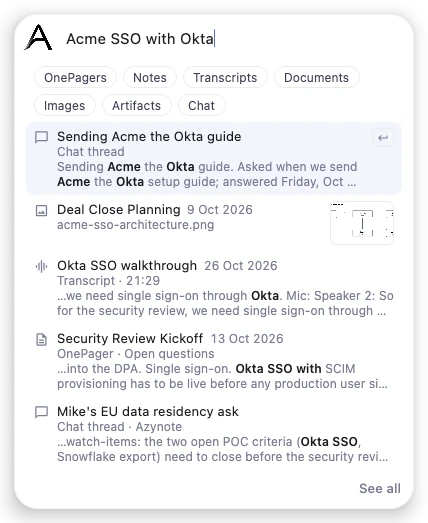
It all runs on one search model, on your Mac, for everyone. If you searched with Gemini before, this is a deliberate choice: one model on the Mac means your whole workspace stays private, whatever engines you use for the rest, and it can do what search could not do before, like finding a screenshot or a scanned page by what it shows.
A picture that follows the meeting#
Some meetings are easier to follow drawn than written. Ask the chat to draw the architecture they are describing, or the plan, or the org chart, and to keep it updated, and the artifact redraws itself each time something new is said. Correct it from the orb when it gets something wrong. Stop it from its window, or let it finish with the meeting, when it takes one last look at the whole transcript.
To do that, the engine running your Chat reads the new lines of the transcript as they come. On a local model they stay on your Mac. On Gemini or OpenAI, they go to that provider, like anything else you ask the chat.
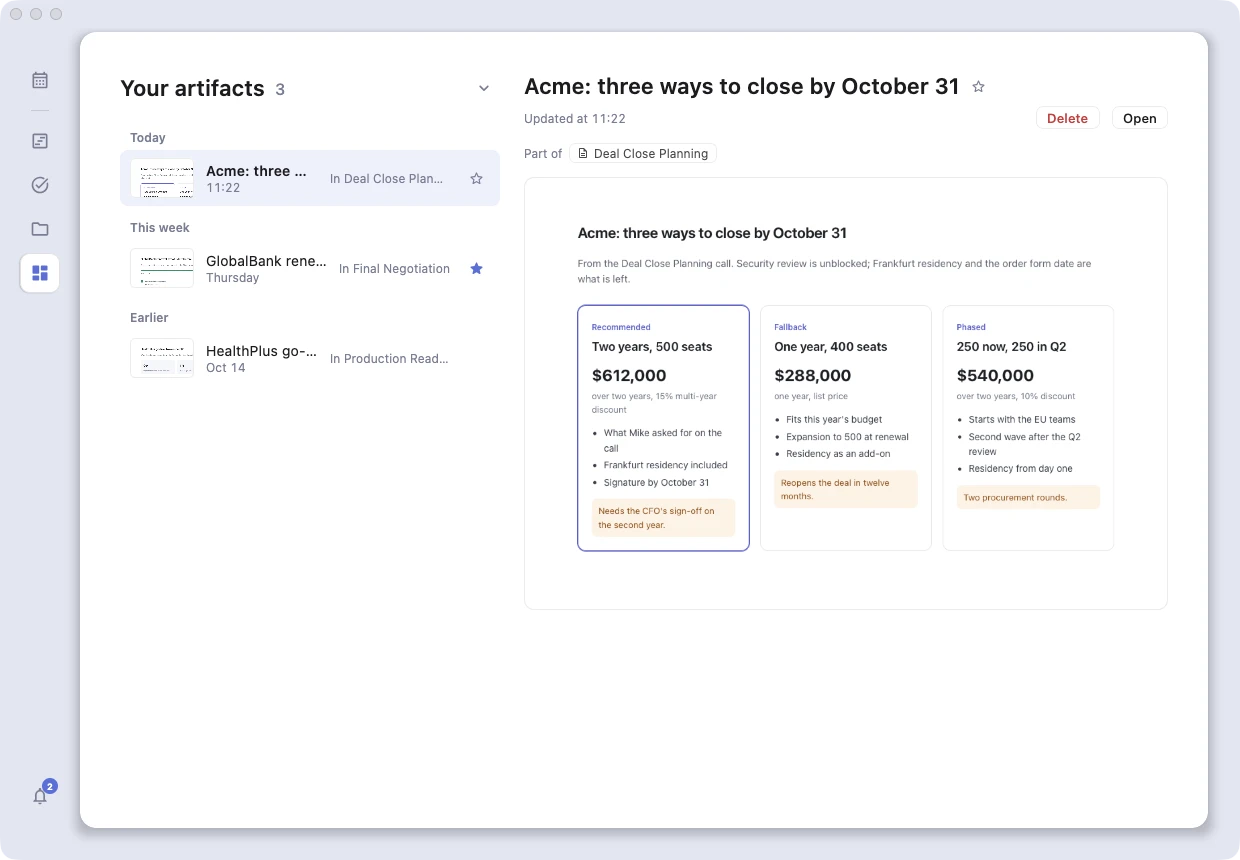
Your artifacts also have a home now. Artifacts in the rail (Ctrl+5) lists every one with a picture of it. An artifact lives once and can be linked from several sessions, so the diagram you drew in the kickoff can sit in the follow-up too without becoming two diagrams. Transform to artifact turns a chat answer into one. And a star on artifacts and sessions, with a Favorites filter, keeps the ones you come back to every week one click away.
Artifacts came out as an alpha in 1.6.1, and so did @azynote events, the events on your Azynote calendar that Azynote runs when they start. With this release, both are now in beta.
Say which meeting you mean#
Asking the agent about "the call with Acme last Tuesday" used to mean hoping it found the right call. Now type @ in the chat or the orb and name the session: the newest ones show at once, and two letters search every subject and one-liner. The agent gets exactly that meeting. The same list offers files: in a thread linked to a session, its attachments, screenshots and artifacts, so you can hand the agent the deck in the same sentence.
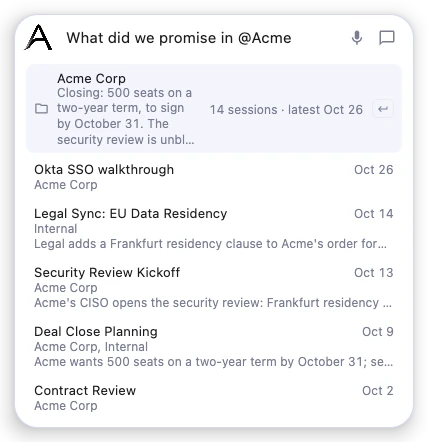
The same @ works in a note. It becomes a link to the other session, which Command-click opens, so a follow-up note can point at the meeting it follows up on.
The chat itself got easier to steer. The gear next to the mic picks the chat engine without a trip to Settings. /gemini, /openai or /acp sends one message to another engine while the thread stays on yours, for the one question your small local model should not answer. Play under an answer reads it aloud. And on a local model, the first message after a pause no longer waits for the model to reread everything.
Or just say "Azynote"#
This one is off until you turn it on, in Settings › Shortcuts › By voice. Say "Azynote" on its own, wait for the soft sound, then say what you want in your own words, in English or French: start dictating, open a new session, search, capture a window, or just ask a question and hear the answer.
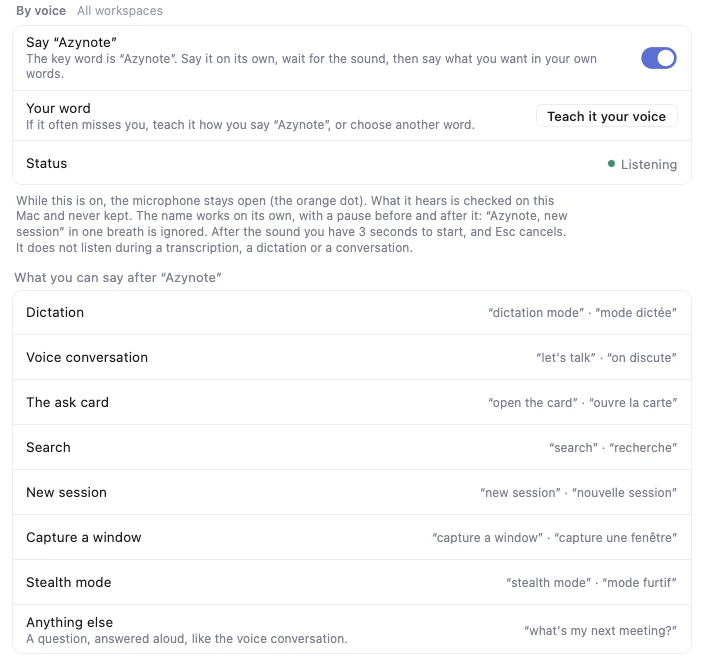
While it is on, the microphone stays open and you will see the orange dot. What it hears is checked on your Mac and never kept, and it does not listen during a transcription, a dictation or a conversation. It needs instant transcription, so your meeting languages have to be among the 25. If it often misses you, teach it your voice with five takes, or pick a word of your own.
A first run that shows you around#
If you are new to Azynote, or setting it up for a colleague, the first run is new too, and it puts everything above to work from the start.
Also in this release#
- Local models: Gemma 4 joins the library, each AI row can use its own model, and every model in the Local AI menu has its own Free button and says when it frees itself.
- Dropped audio and video files get a transcript you can improve, rename, edit line by line and revert, like a live one.
- Subjects get a description, which finds the sessions that belong to them and gets a subject suggested before it has any.
- A default subject for meetings. When a calendar meeting has no subject, Azynote can file its session under the subject you set in Settings › Calendar, instead of asking you each time.
- Check for a new version yourself, any time, from Tools › Check for Updates.
- Fixes: #! instructions in a note no longer leave a raw draft in the OnePager, a Ctrl shortcut no longer types its character into the field, and clicks no longer stop working after a quick window capture.
Looking back at everything in it, this one could have been called 2.0. It isn't, because I have bigger ideas for 2.0. For now, faster transcription, a search that reaches everything, artifacts that follow the meeting and an assistant you can talk to already change how a day with Azynote feels. I can't wait to hear what they change in yours. Tell me at support@azynote.com, I read everything.