Every new Azynote major release so far felt so exciting. But 1.7.0 feels different to me, and it took me a while to say why. I am proud of it, maybe more than of any version before. It brings new features, but it is more about consolidation.
Almost nothing in it needed a new foundation. Sessions, OnePagers, subjects, chat threads, the search model: they were all already there. This version makes them work together on the problems of an ordinary day.
And the most ordinary problem of all is the switch.
Your day is not one long session. It is a call, then a reply you owe someone, then another call on a different account, then back to the first one because they just emailed. Every switch costs you the minute you spend remembering where you were. What was decided. What you promised. What you were in the middle of asking the agent.
1.7.0 is about giving that minute back. Your context follows you into the next session, and it is still there when you come back.
Walk into the call already caught up#
Meeting alerts, in the app and on the orb, now carry a Previously line: the subject's latest status, its open todos, and how many sessions have happened since that status was written, so you can tell whether it is still current.
That is the minute before the call. Open it, read where things stand, tick off the todo you finished yesterday and never marked. In the app you can jump to the last session when you need the detail, or refresh a status that has fallen behind.
Every session keeps its conversation#
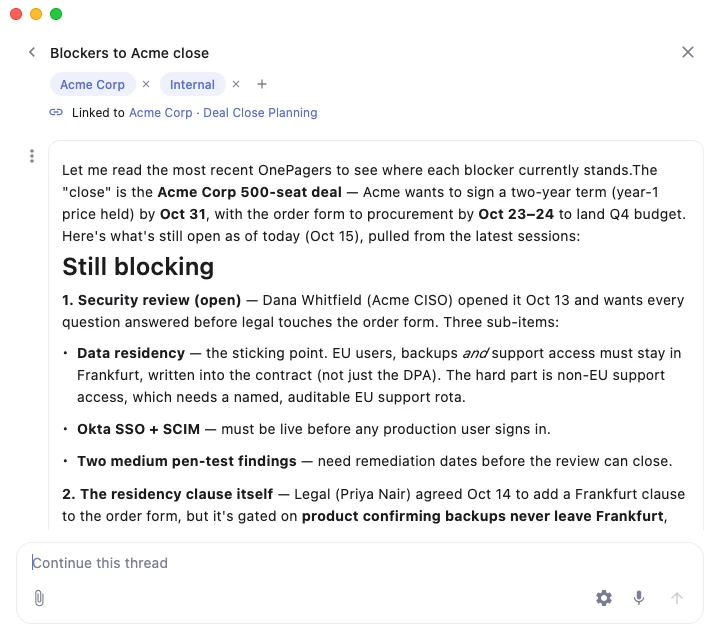
You are in a session, you ask the agent something about it, and you get halfway to something useful. Then the next meeting starts. When you come back, the conversation is somewhere in a list of threads, and you start explaining from scratch.
Each session now has a chat icon in its header. Click it and you are in a thread linked to that session. Leave, do three other things, come back to the session, click it again: same conversation, where you left it. Save as session works the other way round: when a conversation is worth keeping, it becomes a session, and the thread stays linked to it.

Sessions that find each other#
When you come back to a topic after three weeks, the hard part is rarely the session in front of you. It is the other ones: the meeting where it came up under another name, filed under another subject or a related session you didn't even think of because you were too busy.
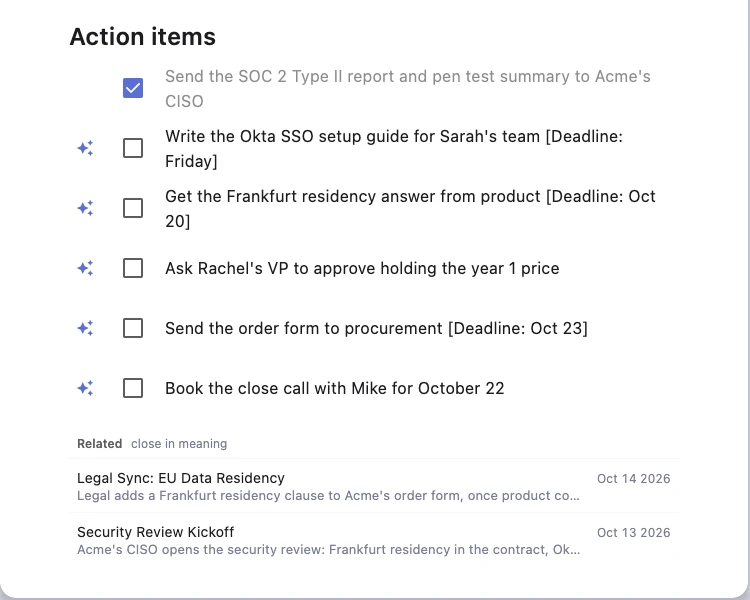
Under every OnePager there is now a short Related list, up to three sessions that cover the same ground. It is strict on purpose: when nothing is truly close, it shows nothing.
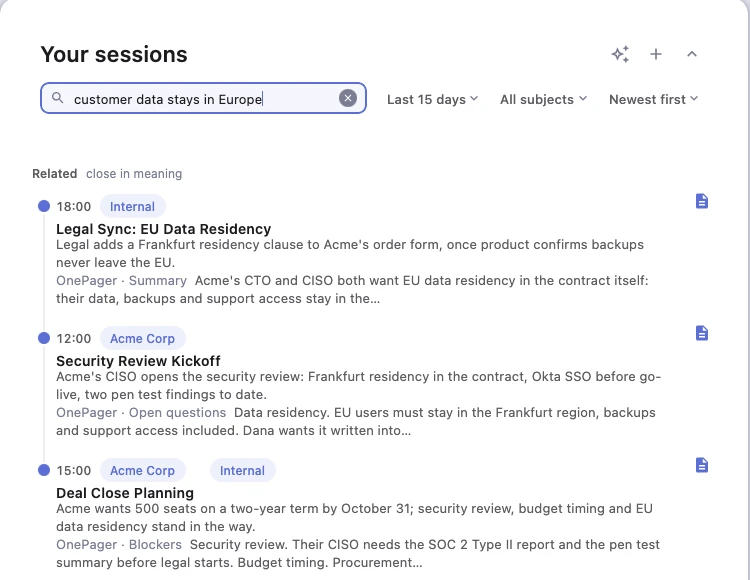
Search got the same idea. Search sessions now reads inside your OnePagers, shows the passage and the section it came from, and reaches past the dates on screen. Below the matches it lists sessions close in meaning, for the times you remember what was discussed and not a single word of it. One honest limit: both read OnePagers only, so a session without one will not show up here yet.
It starts filing things for you#
This is the part that matters most to me, and it is the smallest.
What I want from Azynote, and have wanted from the start, is an assistant that understands my context and adapts to it, instead of me adapting to it. 1.4.0 was a first step: it learned how you work. 1.7.0 takes another one.
A session starts with one subject. Many belong to more: the pricing call that was also about the renewal, the one-on-one that turned into a project review. Linking those by hand is the chore everyone skips, and every skipped link is a session missing from that other subject's status, its timeline, its search, and now its Previously line.
So once a OnePager is saved, Azynote looks at the sessions closest to it and suggests the other subjects it belongs to. By default it asks. If you trust it, Settings › OnePagers › Subjects lets it add them directly, marked auto so you can always tell its choices from yours.


It is a small feature. It is also the first time Azynote organizes your work instead of waiting for you to do it. That is the direction.
Related, search and suggestions all use the engine on your Embedding row in Settings › AI engines. With Local, the text of your OnePagers never leaves your Mac. With Gemini, it goes to Google, as your search already did.
Also in this release#
- Dynamic views are now Artifacts, the name you already know. The ones you made move over on their own.
- Threads you organize. File them under subjects, rename one by clicking its name, pick any two to merge. Azynote never overrides what you chose.
- Actions from the orb's card keep running when you put the card away.
- The chat shows the files you attach, uses the whole window's width, and opens long threads at their end right away.
- If something crashes, Azynote logs it and quits cleanly instead of leaving you with no window.
This release is a direction more than a destination. I want to hear where you still lose the thread when you move from one meeting to the next, and what you wish Azynote understood about your work without you having to tell it. I read everything at support@azynote.com.